Shopify to Acumatica Integration: How It Works, With a Full Demo

Shopify to Acumatica integration demo

If you run an online store on Shopify and manage your operations in Acumatica, you already know the two systems do not talk to each other on their own. Orders pile up in Shopify, and someone has to get them into Acumatica. Inventory changes in Acumatica, but Shopify has no idea. Shipments go out, tracking numbers get generated, and customers wait while someone manually copies that information back into the storefront. 

A proper Shopify to Acumatica integration removes all of that manual work. Orders flow from Shopify into Acumatica automatically, shipments and tracking flow back to Shopify, and both systems stay in sync without anyone touching a spreadsheet. 

In this guide we explain why the integration matters, what it should actually do, and we include a full demo video showing the entire order-to-fulfillment flow from start to finish.

Why Shopify and Acumatica Need to Be Connected 

Shopify and Acumatica each do their job extremely well, but they were built for different purposes. Shopify is your storefront, designed to sell. Acumatica is your ERP, designed to run the business behind the sale, including inventory, finance, purchasing, and fulfillment.

The problem is the gap between them. When those two systems are not connected, your team becomes the integration. Every order placed on Shopify has to be manually entered into Acumatica. Every inventory change has to be manually reconciled. Every shipment and tracking number has to be manually copied back to Shopify so the customer knows their order is on the way. 

That manual process works when you are processing a handful of orders a week. It falls apart the moment your store starts to grow. Manual data entry introduces errors, fulfillment slows down, inventory counts drift out of sync, and customers are left without accurate order updates. What looks like a small operational inconvenience quietly turns into lost time, unhappy customers, and costly mistakes. 

What a Shopify to Acumatica Integration Should Do 

A complete Shopify to Acumatica integration is not just about pushing orders one way. It needs to keep both systems aligned in both directions. 

Orders placed in Shopify should flow into Acumatica automatically as sales orders, complete with customer details, line items, quantities, and payment status. Inventory levels should stay consistent so you never oversell a product that is out of stock. And once an order is fulfilled in Acumatica, the shipment status and tracking number should flow back to Shopify automatically so the customer is updated without anyone lifting a finger.

This is exactly what Alluvia does. Alluvia keeps the full order lifecycle in sync end-to-end, from the moment an order is placed to the moment it ships and the tracking lands back in the customer’s inbox. 

What About Acumatica’s Native Shopify Connector? 

Acumatica offers a native Shopify connector, and for businesses with straightforward requirements it can be a solid starting point. It handles the core connection between the two systems, and plenty of companies use it successfully. 

Where businesses tend to outgrow it is flexibility. As your operation grows, you often need more control over how data is mapped between systems, how orders are processed, and how the integration adapts to your specific workflows. You may also need to connect more than just Shopify and Acumatica, bringing EDI trading partners, 3PLs, marketplaces, and other sales channels into the same picture.

This is where Alluvia fits. Instead of a single fixed connection, Alluvia gives you a flexible integration platform with custom data mapping, real-time visibility into every transaction, and the ability to connect Acumatica to all of your systems through one platform. For businesses that need their integration to do more than the basics, that flexibility is what sets it apart.

See the Shopify to Acumatica Integration in Action 

The best way to understand how the integration works is to watch it happen. In the demo below, we walk through the entire flow step by step, from placing orders in Shopify, to processing them in Acumatica, to syncing the shipment and tracking information back to Shopify. 

One important note before you watch. In the demo we perform each step manually so you can see exactly what happens at every stage. In a live production environment, every part of this process runs fully automated. Orders flow in, shipments flow back, and your team never has to touch it. 

How the Integration Works, Step by Step

Here is exactly what happens in the demo, broken down stage by stage. 

Step 1: Orders Are Placed in Shopify

The flow starts in Shopify where two orders are created. The first order contains five Alluvia hats and two shirts. The second order contains fifteen hats. Each order has a customer assigned and is marked as paid. In a live store, these orders would come straight from your customers at checkout rather than being entered by hand. 

Step 2: Orders Flow Through the Alluvia Portal

As soon as the orders are placed, they appear in the Alluvia portal under the Shopify tab. Each order moves from a posting status to a success status, giving you a clear, real-time view of exactly where every order is in the integration process. Nothing happens in a black box. You can see each document as it moves between systems. 

Step 3: Orders Appear in Acumatica as Sales Orders

Over in Acumatica, both orders show up as open sales orders, each tied to its Shopify order number as the customer PO. Opening each one shows the correct line items and quantities carried over exactly as they were entered in Shopify. The order data is complete and accurate, with no manual re-entry required.

Step 4: A Shipment Is Created and Confirmed in Acumatica

Next, a shipment is created against the order in Acumatica. A package is added, a box size is selected, and a tracking number is entered. In production, that tracking number would be populated automatically by your shipping solution. Once the shipment is confirmed, the fulfillment is complete on the Acumatica side.

Step 5: Shipment and Tracking Sync Back to Shopify

This is where the round trip closes. The confirmed shipment flows back through the Alluvia portal and posts to Shopify automatically. Back in Shopify, the order now shows as fulfilled, and when you open it, the tracking number is right there, synced automatically. The customer can be notified without anyone copying a single piece of data by hand.

Step 6: Full Visibility From One Place

A final look at the Alluvia portal shows both the order and the shipment posted successfully. At any point you have complete visibility into every transaction moving between Shopify and Acumatica, so you always know the status of every order and every shipment. 

The Benefits of Connecting Shopify and Acumatica

When Shopify and Acumatica are connected through Alluvia, the entire order lifecycle runs on its own. Here is what that means for your business.

There is no more manual order entry, which eliminates the data entry errors that come with it. Inventory and order data stay accurate across both systems in real time. Fulfillment moves faster because orders land in Acumatica the moment they are placed. Customers get their tracking information automatically, which improves their experience and cuts down on support requests. And because the integration is built to scale, adding more order volume or more sales channels does not mean adding more manual work. 

Most importantly, your team gets their time back. Instead of copying data between systems, they can focus on actually growing the business. 

How Alluvia Handles Shopify to Acumatica Integration 

Alluvia is an ERP integration and EDI automation platform built to keep Shopify and Acumatica working as one, with the flexibility to grow as you add new sales channels and trading partners.

If you are running Shopify and Acumatica and tired of bridging the gap by hand, we would love to show you how Alluvia works.

Book a Demo Today and see how we can simplify your Shopify to Acumatica integration.

question zone

Frequently Asked Questions

/ 01
Can Shopify integrate with Acumatica?

Yes. Shopify can be fully integrated with Acumatica through an integration platform like Alluvia. Orders placed in Shopify flow into Acumatica automatically as sales orders, and shipment and tracking information flows back to Shopify, keeping both systems in sync without manual data entry.

/ 02
How do Shopify orders sync to Acumatica?

When an order is placed in Shopify, it passes through the Alluvia portal and posts into Acumatica as a sales order, with the Shopify order number carried over as the customer PO. The order arrives complete with customer details, line items, quantities, and payment status, with no manual re-entry required.

/ 03
Does tracking information sync back to Shopify from Acumatica?

Yes. Once a shipment is created and confirmed in Acumatica, the shipment status and tracking number flow back to Shopify automatically. The Shopify order is marked as fulfilled and the tracking number appears on the order so the customer can be notified. 

/ 04
Is the Shopify to Acumatica integration real-time?

Yes. With Alluvia, orders and shipments move between Shopify and Acumatica in real time, and a live portal shows the status of every transaction as it posts. In a production environment the entire process runs fully automated without manual steps. 

/ 05
Does inventory sync between Shopify and Acumatica?

Yes. A complete integration keeps inventory consistent across both systems so you do not oversell products that are out of stock. Inventory levels stay aligned between Acumatica and Shopify automatically.

/ 06
Do I need a developer to connect Shopify and Acumatica?

No. Alluvia is a managed integration platform, so you do not need to build or maintain custom code. The platform handles the connection, the data mapping, and ongoing updates, so your team does not need deep technical expertise to keep the integration running. 

/ 07
What happens if an order or shipment fails to post?

The Alluvia portal gives you full visibility into every transaction, showing each order and shipment as it moves from posting to success. If something needs attention, you can see it immediately and resolve it before it affects the customer, rather than discovering the issue later. 

/ 08
Can Alluvia connect Acumatica to more than just Shopify?

Yes. Alluvia is a full end-to-end EDI and integration platform. Beyond Shopify, the same platform can connect Acumatica to EDI trading partners, 3PLs, marketplaces, and other sales channels, so the integration grows with your business.

image alt
Get Started

Stop losing money to errors and chargebacks.

Free your ERP team from data entry and start scaling smarter. Automate your EDI workflows, cut errors, and boost efficiency.

Stop Treating Your ERP Team Like Data Entry Bots: The True Cost of the Manual Effort Tax

Stressed sap b1 team

The Manual Effort Tax 

You invested in an ERP system to streamline operations, improve accuracy and give your team better visibility across the business.

But when EDI is still handled manually, the people who know your ERP best end up spending their days retyping information instead of doing meaningful work. The Manual Effort Tax shows up as lost productivity, higher chargebacks and teams who are overwhelmed by repetitive tasks. Every time someone re-enters an 850 Purchase Order or tries to rebuild an ASN by hand, they are pulled away from analysis, forecasting and the work that actually drives your business forward.

EDI integration is not only about compliance. It gives your ERP team the time and freedom to use the system for what it was built for smarter decisions and faster growth.
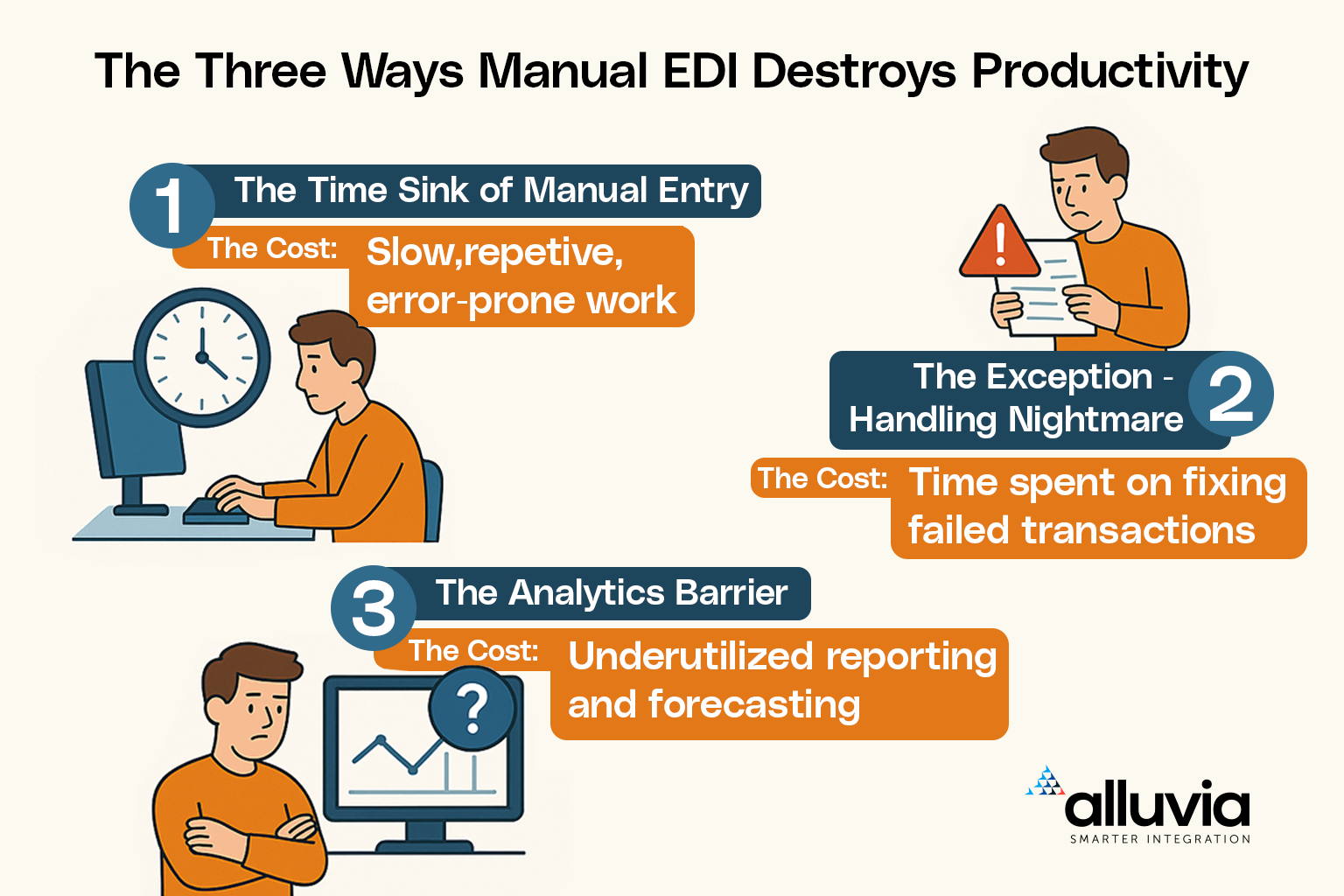
The Three Ways Manual EDI Destroys ERP Productivity 

Manual EDI slows down any ERP system

1. The Time Sink of Manual Entry

Manual EDI turns every document into repeat work.

  • Every 850 Purchase Order requires someone to key in every line.
  • Every 856 Advance Ship Notice requires typing tracking information, carton details and item quantities.
  • Every 810 invoice requires manual matching across several screens.

The Cost: Manual entry is slow and error prone. A single incorrect digit in a UPC, quantity or carton ID can trigger retailer chargebacks from companies like Walmart, Target , Home Depot, Staples, Wakefern, Macy’s or Amazon. Your team loses the time that could be used for planning, analysis or solving real problems rather than typing.

2. The Exception Handling Nightmare 

When manual EDI breaks, and it eventually will, your team becomes responsible for finding the issue. They move between ERP screens, spreadsheets and retailer portals to find inconsistencies.

The Cost: Your most knowledgeable employees, who understand your operations inside and out, end up spending hours chasing errors and reconciling data. They become gatekeepers of broken processes instead of optimizing inventory, improving vendor relationships, or analyzing performance trends across your business.

3. The Analytics Barrier 

Your ERP system is designed to give you powerful insights into performance, trends and forecasting. When EDI is manual, your team never has the time to use these tools the way they were intended.

The Cost: Your reports are incomplete, forecasting becomes less accurate and your data relies on manual typing instead of real automation. You end up with a modern ERP and outdated processes. The benefit of having a unified platform is lost when key operational data is still handled manually.

Automating your ERP + EDI With Alluvia Changes Everything 

When your ERP system and EDI are connected through Alluvia’s purpose-built integration platform, your team finally shifts from manual data work to strategic operations.


Feature  If EDI Is Manual  If EDI Is Automated with Alluvia 
Team Role  Data Entry, Corrections, Firefighting  Oversight, Strategy, Optimization 
Time Use  90% manual tasks,10% analysis  5% monitoring, 95% value-driven work
Data Flow  Slow, inconsistent, human-dependent  Real-time, validated, fully automated
Outcome  High chargebacks, frustrated team  Lower chargebacks, scalable operations 


Alluvia automatically pulls the right data from your ERP, maps it to compliant EDI documents, validates it against retailer requirements, and sends it without manual touch. Your team only gets involved when something truly needs their expertise. 

The Profit-Protection Power of Alluvia’s EDI Solution 

Alluvia is not a generic integration platform.
It is built specifically for ERP and EDI workflows.

Here’s how Alluvia eliminates manual EDI:

1. Zero-Touch ASN Generation (EDI 856) 

Alluvia monitors your ERP’s shipment documents in real time. As soon as an order is fulfilled and shipped, Alluvia automatically performs all the necessary steps: 

  • Pulls tracking numbers and shipment details. 
  • Reads carton IDs and validates quantities. 
  • Builds the ASN (Advance Shipping Notice) instantly. 
  • Sends the ASN to your retailer. 

This eliminates manual typing, portal logins, and the errors that lead to high-cost penalties. 

2. Built-In Retailer Compliance Rules

Every retailer imposes strict, non-negotiable requirements for 850s, 855s856s, and 810s. Alluvia includes out-of-the-box templates and validation rules for major partners like: Walmart, Target , Amazon, Whole Foods,  Home Depot, Staples, Wakefern, Macy’s, and thousands of tradings partners across retail, grocery, logistics, automotive and pharma.

Before any document is sent, Alluvia checks it against the retailer’s rules preventing chargebacks before they happen. 

3. Native Integration Across Your ERP Ecosystem 

Alluvia integrates with your ERP the way it is designed to operate: 

  • It supports key features like Item Masters, Warehouses, Batches, and UDFs in your ERP. 
  • It respects your specific pricing rules, taxes, and logistics workflows. 
  • The integration layer handles the complex EDI transmission, while your team continues working seamlessly within their familiar ERP environment. 

How Alluvia’s EDI Solution Works Across Different ERPs

Every ERP system structures data differently, which makes manual EDI increasingly difficult to manage as you grow. Alluvia is designed to work naturally with each system so your team keeps operating inside the ERP they already know while EDI runs automatically in the background.

SAP Business One (SQL and HANA): Alluvia integrates seamlessly with SAP Business One, leveraging UDFs (User Defined Fields) and supporting both DI-API and Service Layer for maximum flexibility. Whether you need custom field mapping or deep API connectivity, we ensure a smooth, native experience.

SAP S/4HANA: From IDocs to advanced S/4 HANA Rest APIs, Alluvia supports both integration methods across any logistics process. We adapt to your preferred approach while maintaining real-time, high-volume data flow for complex operations.

SAP Business ByDesign: Even as a legacy cloud ERP, Alluvia delivers full compatibility through the complete API and supports extension fields for custom workflows. We make ByDesign integrations effortless and future-ready.

SAP ECC: ECC’s rigid structure and IDoc-based logic can be challenging but not for Alluvia. We handle its legacy complexity with precision, ensuring clean integration without disrupting established processes.

Microsoft Dynamic BC : While BC’s native APIs lack robust custom field support, Alluvia bridges the gap with our own extended API framework, enabling full custom field integration. We go beyond limitations to deliver a truly flexible solution.

Oracle NetSuite:  NetSuite’s unique permission model and complex workflows require expertise and Alluvia has it. We work seamlessly within its architecture, respecting custom fields and saved searches without breaking your logic.

Acumatica: Acumatica’s flexible architecture supports both on-premise and cloud deployments. Alluvia integrates cleanly with its API framework, handling custom fields and workflows without disrupting your configurations.

Ready to Reclaim Your ERP Investment? 

Manual EDI is a hidden cost that grows with every new retailer, every order spike, and every exception. If you want your ERP team to be strategic not stuck doing data entry then your EDI workflows must be automated. 

With Alluvia’s EDI solutions, you can: 

  • Eliminate manual document creation 
  • Reduce chargebacks 
  • Improve compliance 
  • Speed up fulfillment 
  • Free your team for analysis and strategy 

All while using a tool built specifically for you. 

image alt
Get Started

Stop losing money to errors and chargebacks.

Free your ERP team from data entry and start scaling smarter. Automate your EDI workflows, cut errors, and boost efficiency.