A fresh new look.
Same powerful platform

Something new is available inside the Alluvia platform, and we want you to be among the first to try it.

We have launched a beta version of a completely redesigned Alluvia interface, and you can access it right now without leaving your existing platform. A banner inside your current dashboard will guide you directly to the beta so you can explore the new look and feel at your own pace.

Your current platform is not going anywhere. Nothing about your integrations, EDI workflows, or automated processes has changed. This is simply an invitation to experience what is coming next.

Why We Built This

Alluvia’s core engine has always been built for performance. Tens of millions of transactions, orders, and EDI documents flow through the platform each month, and that engine runs reliably in the background for hundreds of businesses every day. 

But as our customers scaled and their operations grew more complex, the question shifted from whether the platform could handle the load to whether the interface could keep up with the people managing it. The answer to that question drove everything in this redesign. 

We talked to operations teams, IT managers, and system engineers. The themes were consistent: faster access to status information, less clicking to find what matters, and a cleaner view of what is happening across all workflows at any given moment. That feedback shaped every decision in the new interface. 

What You Will Notice in the Beta 
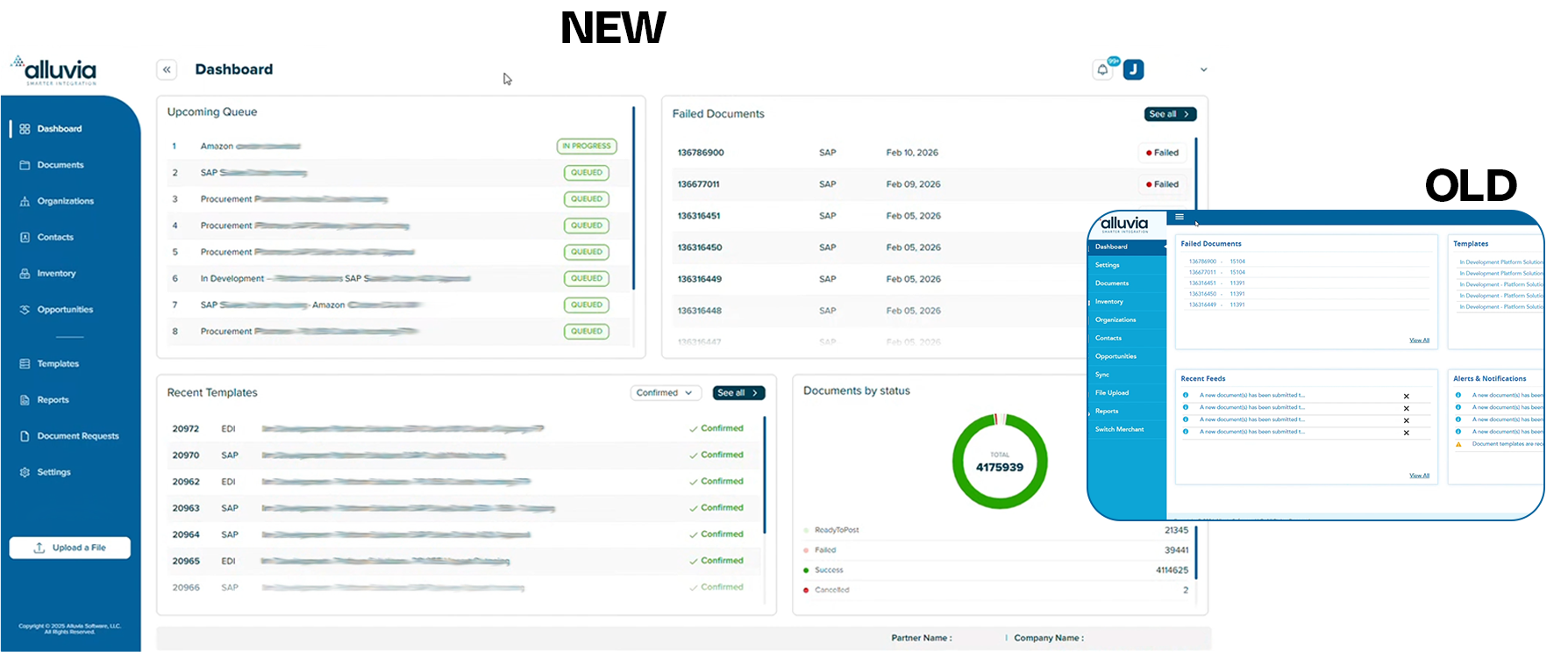
 

Alluvia New UI

A Dashboard Built Around Visibility 

The new dashboard makes transaction status immediately clear. Workflow states like In Progress, Queued, and Waiting are now visually distinct and easy to read at a glance. When something needs attention, you will see it right away instead of having to dig for it. 

This is especially valuable for teams managing high-volume order flows, EDI document exchanges, or multi-system syncs where a single bottleneck can create downstream delays. 
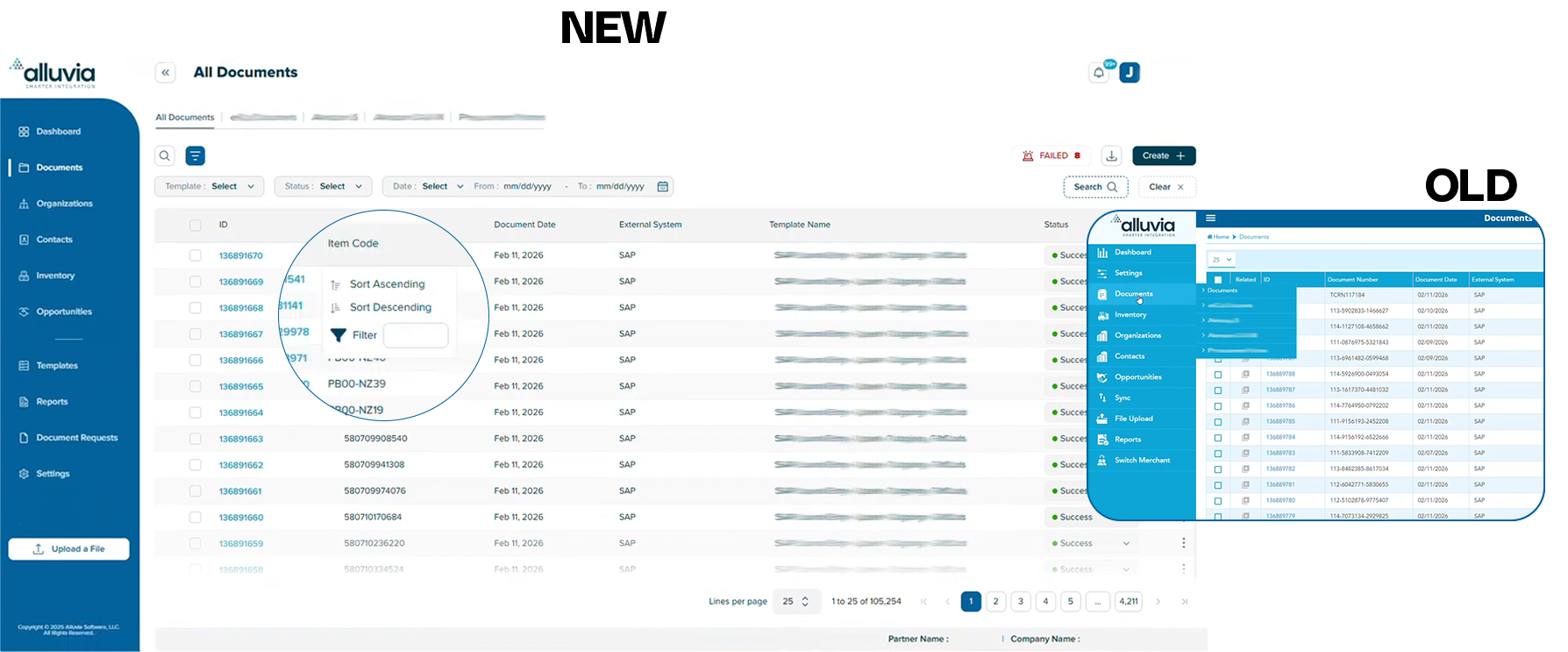
Navigation That Gets Out of Your Way 

One of the most requested changes was reducing the number of steps required to complete routine tasks. The redesigned interface addresses this directly. 

Search, filtering, and sorting are now consistent across every screen. Custom views are accessible from the main navigation. System settings are organized into a single centralized area. Fewer clicks, faster execution, less friction. 

A Faster, More Responsive Experience 

Pages load faster. Large data views are smoother to navigate. Every interaction feels more immediate. For teams managing operations in real time, that responsiveness is not a minor convenience. It directly affects how quickly you can act when something changes. 

"All of your integrations, EDI workflows, and backend systems remain exactly as they are. The beta is your opportunity to explore what is changing before it becomes the default experience"
Alluvia Product Team

How to Access the Beta 

Log in to the Alluvia platform as you normally would. You will see a banner at the top of your dashboard with a direct link to the beta interface. Click it to explore the new design using your existing credentials. 

Here is what to keep in mind: 

  • Your current platform remains fully operational and unchanged 
  • All integrations, mappings, and automated workflows are unaffected 
  • You can switch back to the current interface at any time 
  • The beta uses your live data, so the experience reflects your actual operations 

We are actively gathering feedback during the beta period. If something works well, or something does not, we want to know. This is the stage where your input has the most direct impact on the final product. 

Click here to access the redesigned Alluvia platform.

What Comes Next 

The beta is the first step. Once we have collected feedback and made refinements based on real usage, the redesigned interface will become the standard Alluvia experience for all customers. We will communicate the full transition timeline well in advance so your team has time to prepare. 

For now, the best thing you can do is log in and take a look.

Questions about the beta?
Reach us at feedback@alluviaplatform.com

Our team is available and ready to help.

 

question zone

Frequently Asked Questions

No answer to your question? You can write us your question and we will answer as soon as possible.

/ 01
What is Alluvia, and how does it work?

Alluvia is a cutting-edge integration platform designed to seamlessly connect different systems, platforms, and processes, enabling smooth data flow across your business. It works by providing a user-friendly, automated solution that eliminates the need for manual data transfer or complex coding. With Alluvia, businesses can quickly set up integrations, synchronize data in real time, and optimize operations with minimal effort.

/ 02
What types of systems can Alluvia integrate?

Alluvia supports SAP Business One, NetSuite, and a growing library of ERP systems — including SAP S/4HANA, Microsoft Dynamics, Acumatica, Sage, and more.

/ 03
How long does it take to set up an integration?

Most clients go live in 4 to 6 weeks thanks to Alluvia’s pre-built connectors and guided setup. Say goodbye to 6+ month dev cycles.

/ 04
Do I need internal developers or IT resources to use Alluvia?

Nope. Alluvia is fully managed and user-friendly. Our team handles the technical setup, and you’ll have expert support every step of the way.

/ 05
Can I connect multiple systems at once?

Yes. Alluvia seamlessly connects multiple platforms, from ecommerce and CRMs to AP automation, so you can orchestrate complex workflows across your ERP ecosystem.

/ 06
What happens if I run into an issue?

We offer responsive, real-time support during extended hours to keep your integrations running smoothly. Whether it’s troubleshooting, guidance, or scaling your setup, we’re here to make sure your integration just works.

image alt
Get Started

Stop losing money to errors and chargebacks.

Free your ERP team from data entry and start scaling smarter. Automate your EDI workflows, cut errors, and boost efficiency.

Starting the Year Strong with Alluvia

As we begin the new year, we want to thank you for being part of the Alluvia community. The holiday season brought peak demand, year-end close pressure, and limited staffing for many teams. As operations return to normal, our focus is on helping your ERP, ecommerce, EDI, and finance workflows remain stable, address gaps identified during peak season, and support a strong and productive start to 2026.

Holiday-Ready Integration

As teams worked through the holiday period and year-end close, reliable systems mattered more than ever. Alluvia supported customers in maintaining clean, automated data flows across ERP, ecommerce, EDI, and finance systems during some of the busiest weeks of the year.

How Alluvia supported customers through peak season:

  • Automated order, inventory, and fulfillment workflows
  • Reliable EDI processing without manual intervention
  • Accurate financial data for month-end and year-end close
  • Ongoing monitoring to reduce last-minute issues


Talk to an Integration Expert


Alluvia Black Friday and Cyber Monday Metrics

The following metrics are based on Alluvia platform transaction data and reflect Friday–Tuesday activity across ERP, ecommerce, and EDI workflows in the weeks before, during, and after Black Friday and Cyber Monday.

Friday-Tuesday Transaction Volume

  • Nov 20 – Nov 25 (Pre-BFCM): 3.6M EDI transactions
  • Nov 27 – DEC 2 (Black Friday and Cyber Monday): 5.8M EDI transactions
  • Dec 4 – Dec 9 (Post-BFCM): 4.9M EDI transactions
  • Dec 11 – Dec 16: 4.1M EDI transactions

Black Friday and Cyber Monday generated 2.2 million more transactions compared to the prior Friday-Tuesday period.

Key Friday-Tuesday Performance Metrics

  • +160% increase during Black Friday and Cyber Monday compared to the prior period
  • +117% of peak volume sustained the following week.
  • Peak demand extended beyond the BFCM weekend, not limited to a single event window

KPI Takeaway

Alluvia data shows that Black Friday and Cyber Monday drove a significant increase in EDI transaction volume, with 2.2M additional EDI transactions processed by our customers through the Alluvia platform during the Friday-Tuesday window alone. Elevated activity continued into the following weeks, confirming that peak demand now spans multiple days rather than a single event. These results reinforce the importance of EDI integrations that can scale reliably across extended peak periods.


Costumer Spotlight

From Jobsite to Digital: Jaydee Group Accelerates Construction Supply with Seamless EDI and Ecommerce

Before automation, Jaydee Group’s retailer EDI and ecommerce systems were technically connected but still required heavy manual effort, leading to fulfillment delays, data mismatches, and chargebacks. By standardizing data flows and removing manual handling, Alluvia automated Jaydee Group’s EDI and ecommerce integrations across high-volume retailers and online marketplaces.

The result was faster fulfillment, reduced costs, and more reliable retail compliance.

“Alluvia has significantly improved the speed and accuracy of our retailer EDI and ecommerce workflows. Before their platform, we spent too much time correcting errors and managing issues that slowed fulfillment and sometimes led to chargebacks. Since moving to Alluvia, our order flow has become far more stable and predictable, and their consistently helpful support team has made a clear difference in our day-to-day operations." - Jaydee Group Inc
Jaydee Group Inc


Tip of the Month

Review Performance and Identify Opportunities for 2026

January is the right time to analyze how your supply chain, ERP , ecommerce, and EDI workflows performed throughout the past year. Reviewing peak-season performance helps identify where manual steps, delays, or data gaps created risk.

Use these insights to prioritize automation, improve process reliability, and build a stronger operational foundation for 2026.


Learn more


2025 Highlights at Alluvia

As we close out the year, we are proud of the progress made alongside our customers and partners across ERP, eCommerce, EDI, and finance automation. Throughout 2025, teams relied on Alluvia to simplify complex data flows, reduce manual effort, and create more stable and scalable operations across multiple systems. Together, we focused on building stronger integrations, expanding automation capabilities, and supporting businesses through growth, peak seasons, and year-end close.

Key milestones from 2025 include:

  • Launched a fully redesigned Alluvia.com website to better showcase our platform and integration capabilities
  • Expanded our partner ecosystem
  • Participated in major industry events, including the Microsoft Community Summit and SAP MidMarket Summits in Barcelona and Orlando
  • Doubled our Microsoft practice, strengthening our footprint in Microsoft ERP environments
  • Significantly increased our SAP S/4 customer base
  • Continued growing adoption across NetSuite and Acumatica customers
“From all of us at Alluvia, thank you for your trust and partnership. We are excited to continue building and growing together in the year ahead.”
Alluvia Team

Share your experience on G2

As we start the new year, we would love to hear about your experience working with Alluvia. Your feedback helps other teams evaluating ERP , ecommerce, EDI, and finance automation solutions make informed decisions. If Alluvia has helped improve your workflows, reduce manual effort, or support your operations during peak season, we would appreciate you sharing your perspective.

👉 [G2 Review Link]

image alt
Get Started

Stop losing money to errors and chargebacks.

Free your ERP team from data entry and start scaling smarter. Automate your EDI workflows, cut errors, and boost efficiency.

Survey Shows Black Friday Will Outperform Cyber Monday in Online Sales

As the holidays approach, online retailers are gearing up for two of the biggest shopping days—Black Friday and Cyber Monday.

A recent survey from BlackFriday.com found that shoppers will spend $57 more on Black Friday than on Cyber Monday. What’s even more interesting is that 68 percent of shoppers plan on doing most of their shopping online.

This trend of Black Friday moving online is an opportunity that ecommerce retailers should be ready to capitalize on. Attractive promotions and an impactful website with simple checkout are critical. It is just as important to make sure your inventory is up to date and maintained in real time so you don’t disappoint customers. We recommend taking a few minutes to read the survey results so you can properly strategize for the biggest shopping day of the year.

How To Build a Simple and Effective CRM

Customer Relationship Management (CRM) software is a powerful tool that helps businesses organize data on customers, sales, products, and new prospects.

But many of the leading CRM systems come with customizable features and advanced functionality that can end up slowing down your team.

To make sure you implement a CRM process that keeps your sales and marketing teams informed, agile, and effective, read these seven tips for an effective CRM. While simple in its approach, this guidance can help you steer clear of creating an overly complex process that is unnecessary for success.

Alluvia Partners with ShipStation to Bring New Shipping Efficiencies to SAP Business One

Alluvia, the company that has revolutionized the integration between the SAP Business One ERP system and ecommerce, CRM, and other types of applications, has become an official partner with ShipStation, a leading shipping software for online sellers.

Companies attempting to manually synchronize data between SAP Business One and other applications and platforms can’t keep up with the required fast speed of ecommerce, and manual data entry can lead to errors. But the alternative has been to spend thousands of dollars on consulting fees and many months of development. Alluvia has changed that whole model, creating a ground-breaking way to integrate using a mapping wizard and synchronization templates that automate the integration process between SAP Business One and other applications—including ShipStation.

ShipStation helps ecommerce retailers import, organize, process, and ship orders efficiently from any web browser (including iOS and Android mobile devices) no matter their size. With over 150 shopping carts, marketplaces, carriers, and fulfillment services, including Magento, Shopify, Shopify Plus, WooCommerce, BigCommerce, USPS, UPS, FedEx, DHL, Canada Post, and Amazon Fulfillment (and so many more), you can streamline shipping wherever you sell and however you ship.

Integration of ShipStation with your ERP system or your ecommerce platform automates the entire order fulfillment process, making the partnership between Alluvia and ShipStation a natural fit.

As orders come into SAP Business One, the order details are automatically submitted to ShipStation for label creation. Shipment tracking information is delivered back to SAP Business One, and then to your ecommerce platform. Order details, payment information, label creation, and shipment tracking confirmation are automatically exchanged between ShipStation and your ERP and/or ecommerce platform. Order and shipping management are both simplified and automated, removing manual data entry errors and saving you time.

Integration turns your ecommerce business into a well-oiled machine. Alluvia works behind the scenes without add-ons, nor any changes to your ERP. All systems can speak to each other automatically, removing manual data entry errors, reducing the time it takes to fill orders, keeping inventory updated in real-time, and storing important information on shipment options and tracking confirmations.

We are excited to announce our partnership with ShipStation as we continue to offer comprehensive, powerful, and automated solutions to our customers.

Is Your Ecommerce Business Ready for GDPR?

The European Union’s General Data Protection Regulation (GDPR) went into effect on May 25, 2018.

The legislation will affect online retailers around the world. It is important to educate yourself and prepare your ecommerce business.

The GDPR represents the most important change in data privacy regulation in 20 years. It is designed to unify data privacy laws across Europe, protect the data privacy of all EU citizens, and transform the way organizations treat data privacy. The main thrust of the regulation has to do with “consent” – your ability to prove that consent was given, that you are informing people of their consent, and that you are making it easy for people to opt out.

There is a lot to know, and we by no means consider ourselves expert enough to arm you with everything you need (nor are we in a position to give legal advice). But there are some great resources available, and we would like to share one with you. Internet Retailer has compiled a list of resources covering a variety of issues surrounding GDPR, ranging from what it means to e-retail marketers, the impact on U.S. brands, and a survey to gauge how ready you are. This is a great place to begin digging in to make sure your ecommerce business is ready for GDPR and avoids fines associated with violations.

3 Ecommerce Solutions That Streamline Your Business

If you’re operating an ecommerce business, you have lots options to configure the ideal ordering and fulfillment process.

But with so many choices available, it’s difficult to sort through which tools you’ll need, and which will just bloat your operation or require additional spending. When it comes down to it, there are just three main ecommerce solutions that can make or break your online business, in terms of efficiency.

Here are the three pillars required to create a streamlined ecommerce business.

A quality shopping cart platform

There are lots of shopping carts available, many of which are designed specifically to support ecommerce businesses. But how can you tell which cart will help streamline your business versus options that add cumbersome, unnecessary features?

One of the main points to remember when selecting a shopping cart platform is to take into account not just your current cart requirements, but how and where you see your ecommerce business expanding in the future. By taking into account the ability to grow your business – both vertically and horizontally – in the future when selecting your shopping cart solution today, you create a smooth transition as your company’s sales increase.

Features to look for when selecting a shopping cart solution:

  • Multi-store management capabilities
  • The ability to add new URLs or themes
  • A cart that is easy to customize without requiring lots of additional coding
  • A cart with a vibrant network of partners and members
  • Frequent updates that keep pace with current technology and consumer shopping habits
  • An open API for easy future connections
  • A cart with specific B2B features, if yours is a B2B company

A flexible ecommerce integration system

Your ability to fulfill orders in a streamlined manner is dependent on the flexibility and performance of your integrations. Not only should your ecommerce integration software mesh seamlessly with your shopping cart, but it must be able to integrate with other services, such as your company’s fulfillment network.

As with your shopping cart, remember that your ecommerce integration software should be designed to expand with your business, without requiring additional custom coding or deep development. As your ecommerce business expands into multiple domains, your integration platform should be able to keep up by accommodating different scenarios and workflows without requiring a separate system for each.

Remember that to keep your ecommerce business operating without any hiccups, you should select an ecommerce integration software platform that features automatic updates to documents, so you are not required to hire a custom software developer.

A robust fulfillment network

Being able to fulfill orders fast and accurately is at the heart of any successful ecommerce business. If you’re fulfilling orders in-house, make sure your ERP system adapts to your process and doesn’t slow you down.

If you aren’t able to fulfill orders in-house – or you have outgrown this option – then be sure to partner with a proven network. There are many services with long track records of reliable and efficient order fulfillment. Amazon FBA, eFulfilliment Service, and Newgistics are a few – but there are plenty of other services available.

Before selecting the right fulfillment partner, do your homework. Not only look at pricing for actual order fulfillment (usually tied to the size and weight of the products you are shipping), but consider costs associated with storing your products in your partner’s warehouse, how well the partner manages returns and their level of customer service – both toward you and the people buying your products.

Finally, examine how easily their software can integrate with your own ERP, ecommerce or shopping cart systems. If you’re using an all-in-one integration platform that includes this fulfillment partner already, you’ll be able to avoid custom development that drains time and slows down your operation.

New ecommerce solutions are emerging daily to help online businesses sell more efficiently. Don’t get mired in aging systems just because it’s the way you’ve always done business. As you utilize these tools to streamline your ecommerce business, you free up time and space to innovate additional products and services that will better serve your customers.

For more information about how Alluvia’s all-in-one ecommerce integration software can help streamline your business, contact us today.

How the Right Ecommerce Integration Software Can Boost Sales

Today’s ecommerce ecosystem has opened up new revenue opportunities for online retailers.

When you have a reliable ecommerce system in place, you can attract customers from any demographic or location, without needing to present your products in person. With the elimination of language and location barriers, the entire world becomes your storefront.

Of course, with all these opportunities come real-world logistical challenges. ecommerce businesses are forced to operate in an extremely fast-paced environment, as customers’ tolerance for waiting shrinks daily. Major online retailers like Amazon have set a new standard in customer expectation that orders will be shipped and received in a matter of days, if not sooner. Whether you fulfill orders in-house or rely on a fulfillment partner, your business must be able to fulfill orders right away. And of course, in the small world that is online sales, your customers have the final say, as they publicly share their experiences with your company in the form of online reviews or forums.

All components of your supply chain must be working flawlessly in order to ensure that you can deliver not only your fantastic products but a superior customer service experience as well.

At the crossroads of all these moving parts is your ecommerce integration software, which can streamline your sales process – or slow you down dramatically. With the right integration software, all these challenges become opportunities – to sell more, expand your product line and serve your customers better.

The ideal ecommerce integration software helps you boosts sales by

Introducing new revenue opportunities

The right ecommerce integration software enables to you to approach large retail chains without worrying about being able to integrate with their software.

Enabling omni-channel integration

No matter where your customer buys your product – from mobile to desktop to a brick & mortar store – your ordering process appears seamless, easy to use and completely reliable.

Allowing smooth integration with external fulfillment networks

Your successful ecommerce business should not be limited to selling only on your own website. If you partner with other popular ecommerce channels (ex. eBay), your ecommerce integration software must be able to handle order requests coming from a multitude of different directions, each with varying requirements.

Showing only what is in stock and available

Your ecommerce integration software should be able to display only the items that you’re able to fulfill immediately and display dates when out-of-stock products will become available. This eliminates the customer backlash that accompanies surprise wait times that are revealed after payment has been made.

Facilitating seamless communication with your fulfillment partners

If you’re using a third-party order fulfillment network, the right integration software will streamline your back-and-forth. All-in-one platforms consolidate information into a single place, integrating your shopping cart, ERP, and your partner’s system into a single transaction that is updated in real-time, so it’s easy to track.

Keeping pace with integrated documents updates

Your integration software should provide you with updated documents, without requiring the need for custom coding connections as information requirements change. All-in-one platforms prioritize this since connection requirements change frequently.

Building trust with your customers

Customers won’t tolerate gaps in communication when ordering from an online retailer. Your integration software should provide reliable two-way communication during every step of the transaction, keeping your customers informed with an accurate picture of when they will receive their order.

Speeding your order fulfillment

By replacing manual processes with integration software, you eliminate time-consuming actions that drain man-hours from your operation. When you use an automated integration system, your product managers can focus on your organization’s bigger order sales picture, not individual transactions.

Enabling drop shipping opportunities

A robust integration platform means you can expand your product offerings via drop shipping. When your software integrates efficiently with outside vendors and presents a seamless experience for your customers, you can offer a greater variety of products to your customers under your brand umbrella.

Don’t let your integration software get in the way of growing your sales. Gone are the days of relying on cumbersome, custom-developed integration software. Emerging platforms prioritize speed, efficiency, and flexibility – all the things that today’s ecommerce business needs to be successful.

For information on how Alluvia’s all-in-one platform can streamline your ecommerce sales process, contact us today.

6 Must-Ask Questions Before Choosing ERP Integration Software

Selecting the right ERP integration software partner can save you lots of time, money and unnecessary stress in the long run.

But how can you tell which software provider will be able to deliver what you need? It’s hard to know before you begin working with the actual product. Luckily, by asking a few questions before you commit, you’ll be able to learn a lot.

Question 1: What happens when I need to implement a new connection?

Ask your software partner to articulate the exact steps and timeline required to get up and running with a new connection. How long does their development process take? Do they build a custom solution from the ground up (which eats up lots of time for development and testing)? Or do they already have that connection pre-configured and waiting for you to begin using right away? The faster you can implement a new connection, the sooner you can begin generating revenue from that channel.

Question 2: Are there any additional costs?

ERP solution partners generate revenue by charging their customers additional fees to develop more than the initial round of integrations. It makes sense. These companies need to stay in business and ongoing development fees are a way to make money. On the other hand, automated ERP integration software is generally more self-contained when it comes to pricing. Since the software has already been developed, you usually only pay a flat monthly rate for only the documents you use. You know what you’re paying up front.

Question 3: Will this software be able to match my company’s workflow?

Look for a software provider whose products can adapt to your operations. Yes, custom integration solutions are developed to integrate specifically with your unique workflow and validation processes. However, today’s cloud-based, plug-and-play ERP integration software solutions are also flexible enough to be configured to match your workflow. It’s usually not necessary to invest in an expensive custom solution.

Question 4: How long will set-up take?

Custom-coded solutions usually take months to configure and deploy. Additional connections require even more time. Automated ERP integration software systems can get you up and running in days. If the integrations you need are already part of the system, time until deployment can shrink to one day.

Question 5: Is the provider a dedicated ERP integration software developer?

Look for companies who are dedicated software developers with marketplace and ecommerce expertise. Some companies are just ERP solution providers who developed a one-off solution for a particular customer and are now trying to re-sell it to others. Dedicated ERP integration software companies specialize only in the ongoing development and release of automated ERP integration solutions that keep pace with the marketplace.

Question 6: What kind of support will I receive?

This question has two answers. If you’re developing a custom software solution from the ground up, you’ll likely need lots of support from your ERP consultant. A support team should be standing by to help you with the inevitable hiccups that will arise during deployment. In that case, make sure that your provider offers a fixed period of unlimited support to help your team get up and running.

If you’re using an automated system, support should be available–but you likely won’t need it. These systems are designed to be intuitive and user-friendly, so the software itself is intrinsically more manageable. These providers should also offer support, but it’s much more likely that you’ll have a question or two, rather than require a lengthy training process.

Take your time when selecting the best ERP integration software for your business. Don’t simply stick with the software you have been using because you think it will be difficult to make a change. Remember, the best solution for your business might not be the most expensive. As ERP systems and integration software continue their rapid evolution, more streamlined, flexible solutions are emerging at more reasonable prices.

To learn more about how Alluvia’s ERP integration platform can help your business, contact us today.

5 Signs You Should Invest in ERP Integration Software

It’s a story that plagues many of today’s manufacturers and distributors.

Your company just invested in an expensive ERP system. You brainstormed with your software development company. You held round after round of meetings. After months of back and forth, you are finally ready to implement a powerful ERP system tailored specifically to your business that features integrations for your biggest clients. You’ve tested it, installed it and finally pulled the trigger to launch. And it works! Your ERP system is streamlining your operations and supporting your sales efforts. It’s a dream come true…

…Until you seal a deal with a new major retailer. Or you open a new line of ecommerce business. Now your expensive software system can’t provide seamless ERP integration with your new sales channel. You’re back to workarounds. You contact your software development partner and discover that to make your ERP communicate with your new customer, you will need to repeat the development process all over again. It will take weeks. On top of that, you’ll have to invest even more money. All of this just to keep up with your expanding sales network.

On the other hand, you can avoid this laborious process by investing in off-the-shelf ERP integration software. Rather than a hulking, time-consuming custom-developed software solution built by the ERP companies and retrofitted to meet your integrated document needs, all-in-one ERP integration software is agile, frequently updated software designed by experts to respond to the way modern companies do business.

But how do you know if you should extricate yourself from “business as usual” and invest in stand-alone ERP integration software? Here are 5 signs to look out for.

  • You’re doing double data entry. If there is any data in your system that you must re-enter during another part of your transaction, you can benefit from ERP integration software.
  • You’re performing manual data entry for more than a few orders. If you are finding that your teams must enter data manually on more than the occasional document for an outlier client or two, your business can benefit from automation.
  • You’re being held back from expanding into new sales channels. If your business plans to open new revenue streams by selling your products in different marketplaces, automated ERP integration software will help you keep up with expansion. Plug-and-play integration software includes integrated connections for the world’s most common retailers and ecommerce providers, and supplies new connections for emerging channels.
  • You can’t fully commit to new contracts. If you’re going into meetings with buyers from large retail chains, you should be able to state with confidence that your business has the appropriate ERP integration software in place, so you can begin fulfilling orders immediately. If you can’t agree to start doing business with your new partner right away, the speed-to-deployment that comes with an automated system can likely help you.
  • You receive consistent chargebacks from your partners due to data errors. If you deal with big companies who issue a chargeback because of a minor error–like a wrong quantity or an invoice with an incorrect amount–you can benefit from automation. All-in-one ERP integration software maintains consistency across data sets and alerts you when there is a problem so you can take action immediately.

Automated integration software doesn’t mean that you have to scrap your current investment or adjust to a totally new workflow. You can keep the ERP system you have already implemented and simply enhance it with flexible software that takes over integration. The software will stay in line with your existing rules and business logic.

All-in-one ERP integration software is also pre-configured to provide integrated connections to many different retailers, services and marketplaces. The software not only features updated connections to the most common sales channels, but the built-in integrations keep expanding to keep up with the market.

If you are tired of the time and resources it takes to stay in a state of perpetual software development in order to keep up with your sales partners – or if any of the above signs are apparent in your workflow – automated ERP integration software is likely the ideal solution for you.

To learn more about how Alluvia’s ERP integration platform can help your business, contact us today.